
Onboard faster
CMS Content Scheduler
Lorem ipsum, dolor sit amet consectetur adipisicing elit. Maiores impedit perferendis suscipit eaque, iste dolor cupiditate blanditiis ratione.
Role: Product Manager, Product Designer
Contributions: PRD, UX Flow, UI Mockups
Result: 30% higher success rate when authenticating users.


Content Scheduler
Schedule when you want content to be added to your collection easily in the DML Publisher Hub

Product Building Process
Research
Best practices
Technologies stacks
Architecture
Design
Analyze
What did I learn from researching? How do we begin building?
Design
Create mockups and wireframes of the product
Prototype
Work with engineers to build the product
Background
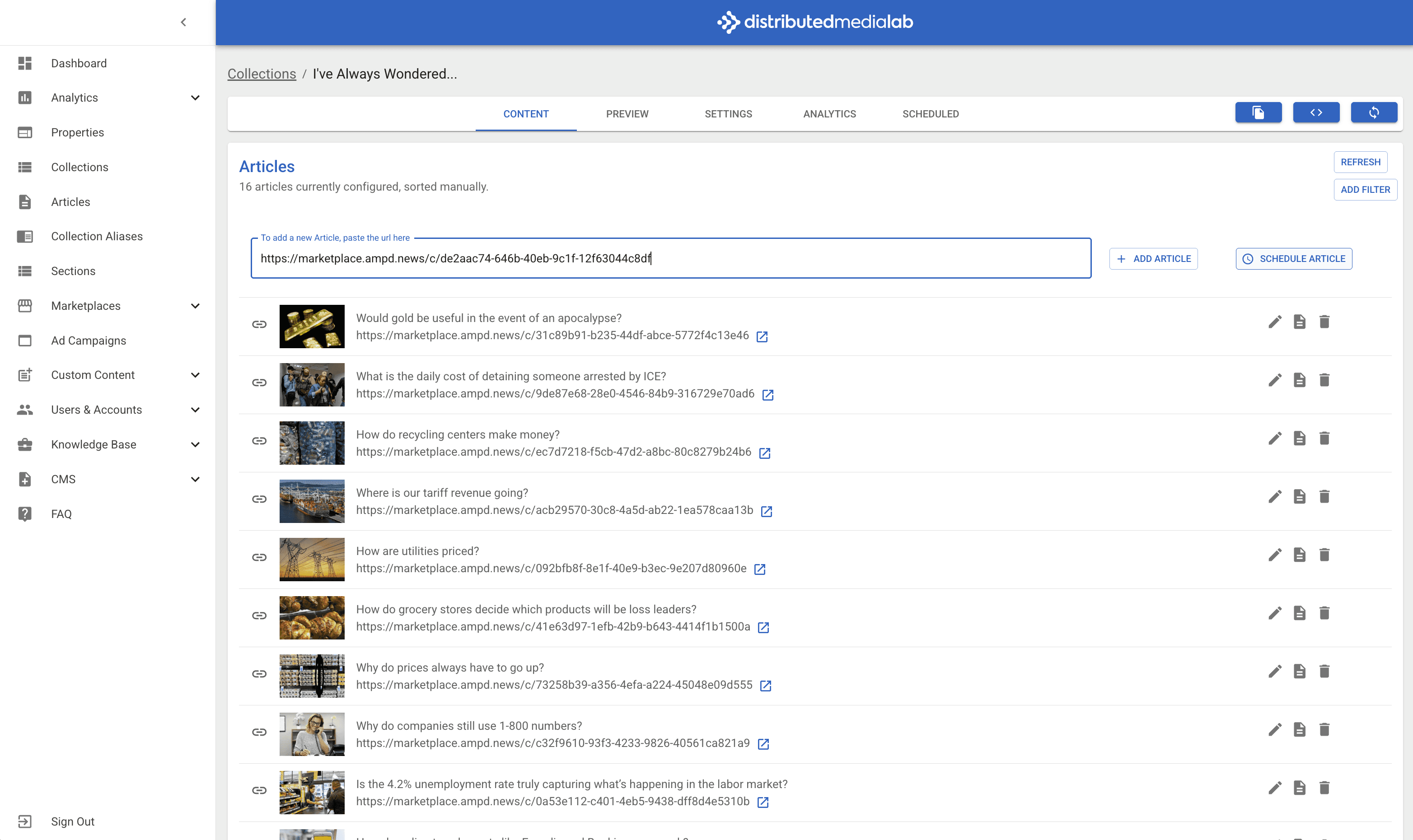
We needed to have the ability to add AMP URL's to a collection on a specified date and time.
Previously, we only had the ability to "Add now".
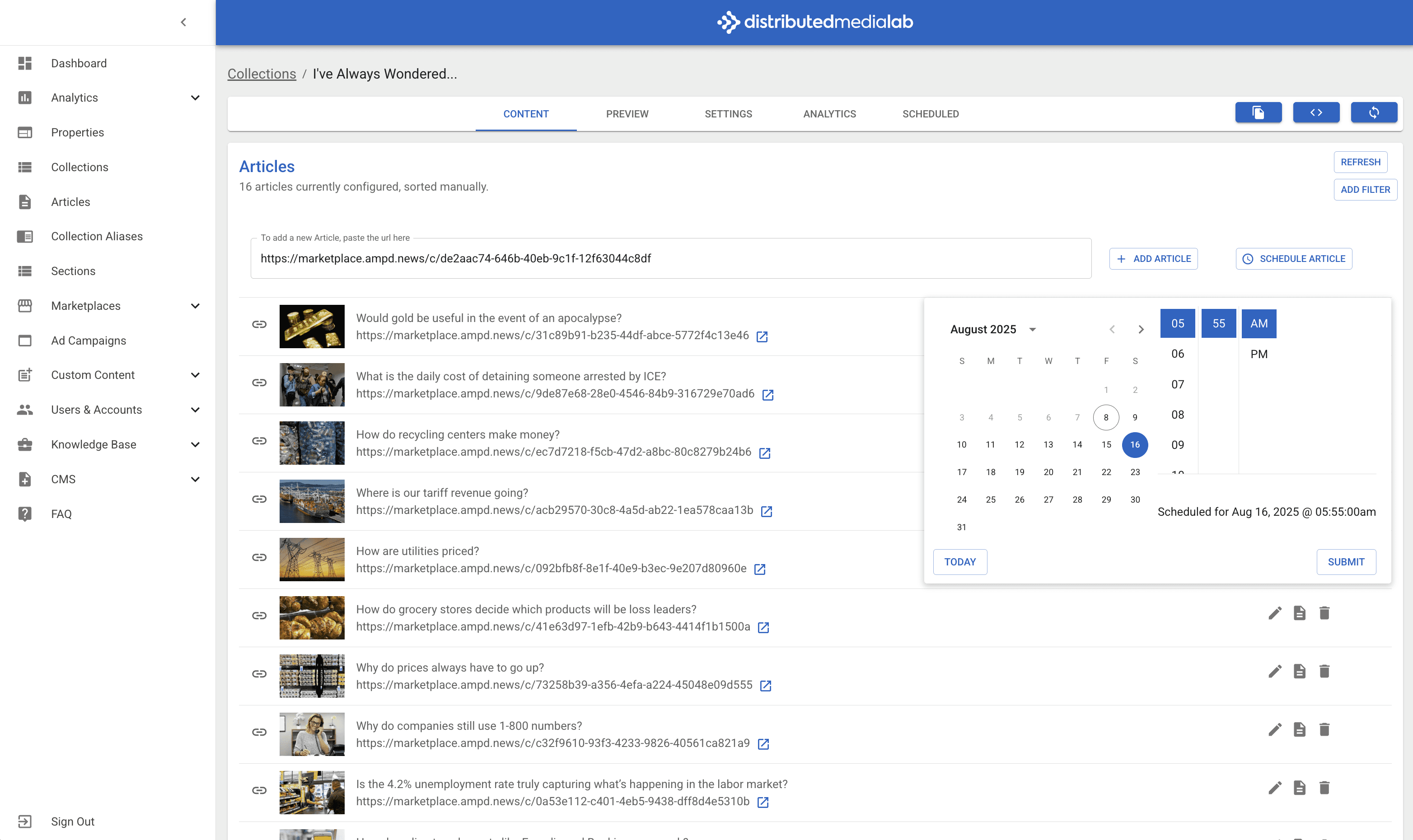
Once the events had been created, we need to be able to see when the story is scheduled. For this, there is a separate "Scheduled" tab within the selected collection in the DML Console.
Research
Infrastructure and API Changes
Once it was decided that this was going to be an essential part of our platform, it was time to talk to the engineering team.
Our lead engineer, Alec Flatness elaborated on the infrastructure changes required for new features, including creating new API routes, deploying new Lambda functions, and setting up new service roles.
Such changes necessitated updating environment variables for both admin and Publisher Hub APIs across beta and production environments, and highlighted the ongoing effort to upgrade older Lambda versions for future support.
Backend Logic and Data Management
Topics discussed prior to building included details like; saving articles and creating events, including validating articles, checking for existing IDs, and handling cases where a URL might already exist. The engineering team emphasized the importance of identifying necessary variables from the frontend, such as article URL and date/time, and considering future data utility, like saving the user who scheduled an event.
The team also explained the process of scraping data for new articles and how they leverage AWS documentation to determine necessary parameters for services like EventBridge.
Error Handling and Fallback Procedures
Error handling and fallback procedures when dealing with third-party integrations like AWS were going to be crucial for this project. The flow of scheduling an event before saving data and the importance of reverting the data if the save operation fails was created by our engineering team.
Material UI (MUI) scheduler component
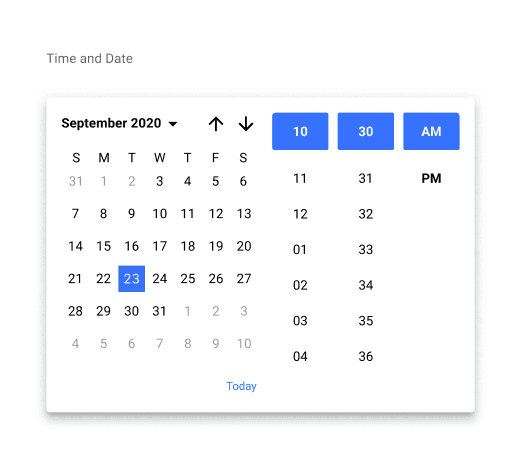
Material UI (MUI) already had a pre-built component for scheduling time and date.
MUI components were used for the entirety of the UI.
Event Scheduling Implementation
Research conversations included the process of implementing one-off scheduled events in AWS, focusing on how to configure SDKs to run a Lambda function at a specific time to update debt data. They explained the top-level process of creating an event, syncing it to a new Lambda, and then deleting the event after it has run, as these are one-off occurrences.
The engineering team also outlined their preference for backend development before frontend, noting that backend work is the core of a feature and changes to it can necessitate frontend adjustments.
Analyze
Where do we start?
Backend-First Development Approach
The Philosophy: The team prioritizes building the core backend logic and functionality before developing the user-facing frontend.Reasoning: The backend is considered the "core" of the feature. Changes or unforeseen complexities discovered during backend development can significantly impact the frontend's design and functionality. By solidifying the backend first, they ensure the foundation is stable, reducing the risk of having to rework the frontend UI and user experience (UX) later on.
The UI design was simple for this project. Most of the magic happens in the backend. Although we could have created wireframes for the front and backend, we opted not to. This was a discussion I had with the team. The consensus was that different projects have different necessities, and our goal is to use the minimum amount of resources to complete the task.
Prototype
Error Handling and Fallback Procedures
The process of scheduling an event and saving the data should be treated as a single, atomic operation (a transaction).
The Flow:
User initiates the scheduling of an AMP URL.
The system first schedules a one-off event with the AWS infrastructure (e.g., using a service like AWS EventBridge or a similar scheduling mechanism).
Only after the event is successfully scheduled, the system attempts to save the scheduling information to the database.
Fallback: If the database save operation fails for any reason (e.g., database connection error, validation failure), the system must immediately trigger a "revert" or "rollback" procedure. This procedure cancels or deletes the one-off event that was just created in AWS. This prevents a phantom scheduled task from running later without the corresponding data in the system.
User Interface (UI) Implications: The UI needs to provide clear feedback if the eventual Lambda function fails to add the article. This is where the "failed scheduled event" flag comes in. The UI should then offer two clear call-to-actions for the user:
Retry: This would re-initiate the scheduling process, attempting to run the Lambda function again.
Manually Add: This allows the user to bypass the automation and manually input the article to the collection, resolving the issue without relying on the scheduled task.
Submitting URL in DML Console
Selecting date in DML Console
UI Mockups

Event Scheduling Implementation
This describes the specific technical implementation for how the one-off scheduled events are handled on the backend using AWS.
Key Components:
AWS SDKs: These are the tools used to interact with AWS services from the platform's backend code.
Lambda Function: A serverless compute service that runs the code responsible for adding the article to the collection.
One-off Scheduled Events: The mechanism (likely a service like EventBridge, but possibly a custom solution) that triggers the Lambda function at a specific, future time.
The Process:
The backend code uses the AWS SDK to programmatically create a new, one-off scheduled event.
This event is configured to trigger a specific Lambda function at the date and time the user selected.
The Lambda function's job is to take the provided AMP URL and add it to the correct article collection.
Self-Cleanup: Since these are "one-off" events, a crucial part of the process is that after the Lambda function runs, the event that triggered it is deleted. This prevents the AWS environment from becoming cluttered with old, no-longer-needed scheduled tasks.
Lamda Functions
User Initiates a Scheduled Event
A user interacts with your platform's UI and selects an AMP URL, a target article collection, and a future date and time to add the URL.
The platform's backend receives this request.
The Backend Creates the Scheduled Event
Your platform's backend code (likely a web server) uses the AWS SDK to communicate with an AWS service like EventBridge Scheduler.
It creates a new, one-off scheduled event. This event is a configuration that tells AWS: "At this specific time (e.g., August 15, 2025, at 10:00 AM), trigger this specific Lambda function."
Crucially, the event's "payload" or "input" is configured to include the necessary data: the AMP URL and the unique identifier for the article collection.
The Backend Saves the Data (Transactionally)
After successfully creating the scheduled event in AWS, the backend then attempts to save the details of this scheduled task to your own platform's database. This record would include the AMP URL, the collection ID, the scheduled time, and a status (e.g., "pending").
Fallback Procedure: As Alec Flatness mentioned, if this database save operation fails, the backend code must immediately use the AWS SDK to delete the scheduled event that was just created. This ensures the system remains consistent and you don't have a scheduled task that will run without a corresponding record in your database.
The Lambda Function Waits to be Triggered
The Lambda function itself is deployed to your AWS account. It doesn't run at all during the scheduling phase. It just exists as a piece of code, configured to be a target for the scheduled event.
Its job is to wait patiently for the "alarm clock" (the EventBridge event) to go off.
The Scheduled Event Triggers the Lambda Function
At the exact date and time the user specified, EventBridge Scheduler triggers the Lambda function.
It passes the event payload (the AMP URL and collection ID) to the function as input.
The Lambda Function Executes Its Task
The Lambda function "wakes up" and receives the data.
It executes its core logic:
It connects to your database.
It fetches the article collection record using the provided ID.
It validates the data (e.g., checking if the URL is valid, or if the collection exists).
It adds the AMP URL to the collection's data structure in the database.
It saves the updated collection record.
The Lambda Function's Result Determines the Outcome
Success: If the database operation is successful, the Lambda function completes its execution without errors. This signals a successful completion of the task.
Failure: If any part of the process within the Lambda function fails (e.g., the database connection times out, the collection ID is not found, a validation rule fails), the function will throw an error. This is a critical signal for your system.
Cleanup and User Notification
After the Lambda function finishes (either successfully or with an error), the one-off scheduled event in EventBridge Scheduler is automatically deleted. This prevents the AWS environment from becoming cluttered with old events, as noted by Alec Flatness.
Your platform's system would then receive a notification of the Lambda's outcome (via logs, a different service like CloudWatch, or a dedicated error queue).
Success: The UI for the article collection can be updated to show the newly added AMP URL. The scheduled event record can be marked as "completed."Failure: Your platform's system would recognize the error. The UI would then display the "failed scheduled event" flag, and the record in your database would be updated to reflect this failed state. The user would then be presented with the "Retry" and "Manual Add" options to resolve the issue.
Backend Logic
Key pieces of backend logic:
Request Handling: The backend receives a request from the user's browser, typically through an API endpoint. For your scheduling feature, this would be an endpoint like /api/schedule-article. This request will contain the user's data (the AMP URL, the collection ID, and the desired date/time).
Data Validation: Before doing anything else, the backend must validate the incoming data. This is a critical security and data integrity step. The logic would check:
Is the user authenticated?
Is the user authorized to modify this specific article collection?
Is the provided AMP URL a valid URL format?
Is the specified collection ID a valid ID that exists in the database?
Is the scheduled date and time in the future?
Core Business Logic (The Transaction): This is where the core functionality of the feature happens. The process should be treated as a transaction to ensure data consistency.
Step 1: Scheduling the Event. The backend logic will call the AWS SDK to create a one-off scheduled event. This event is configured to trigger a specific Lambda function at the chosen time, with the AMP URL and collection ID as its payload.
Step 2: Database Save. If the event is successfully created on AWS, the backend logic then proceeds to save a record of this scheduled task in your database. This record is essential for the UI to display the "Scheduled for..." status.
Step 3: Fallback/Rollback. This is the "A/B" of the transaction. If the database save fails for any reason, the backend logic must immediately trigger a rollback. This means using the AWS SDK to delete the event that was just created. This prevents a "dangling" scheduled event that would run without a record in your system, leading to confusion and potential errors.
Error Handling and State Management: The backend logic is responsible for capturing and responding to errors.
If the initial request fails validation, the backend sends a clear error message back to the frontend (e.g., "Invalid URL format").
If the Lambda function itself fails, the backend needs a mechanism to be notified of this failure. This could be through a separate service (like an error queue) or logs that are monitored. The logic would then update the scheduled_events record in the database, changing its status from "pending" to "failed," which triggers the "failed scheduled event" flag in the UI.
Data Management
Data management is about how your application stores, retrieves, and organizes information. It provides the persistent storage that makes your application stateful and reliable.
Database Design: A well-structured database is essential. For your platform, the database would likely have at least the following tables (or collections, if using a NoSQL database):
users: Stores user information, including a secure hashed password for authentication.
article_collections: Stores the metadata for each collection (e.g., collection name, a list of AMP URLs, and a reference to the user who owns it).
scheduled_events: This is a new table for your feature. It would store a record for each scheduled task, including:
event_id: A unique identifier for the scheduled event.
amp_url: The URL to be added.
collection_id: The ID of the target collection.
scheduled_time: The date and time the task is set to run.
status: A field to track the state of the task (e.g., pending, completed, failed). This is what the UI will read to display the correct flag.
API Endpoints: The backend uses APIs to act as a bridge between the frontend and the database. The frontend makes requests to these endpoints, and the backend handles the database operations.
GET /api/collections/{id}: Retrieves a specific collection and its articles. The backend would query the article_collections table.
POST /api/schedule-amp-url: This is the endpoint that triggers your new feature's logic. It receives the user's data and initiates the transactional scheduling process.
POST /api/schedule-retry/{event_id}: This endpoint would be used when a user clicks the "Retry" button. The backend would find the failed event record, create a new one-off event with the same data, and update the status in the database.
POST /api/collections/add-manual: This endpoint would be used for the "Manual Add" option, bypassing the scheduling logic and simply adding the URL directly to the collection.
Data Consistency and Integrity: The backend is the guardian of the data. It ensures that the data in the database is accurate and free from inconsistencies. For instance, the transactional logic for scheduling is a prime example of a system designed to maintain data integrity. The system will never be in a state where an event exists in AWS but not in your database, or vice versa, because of the carefully managed fallback procedure.
Onboard faster
CMS Content Scheduler
Lorem ipsum, dolor sit amet consectetur adipisicing elit. Maiores impedit perferendis suscipit eaque, iste dolor cupiditate blanditiis ratione.
Role: Product Manager, Product Designer
Contributions: PRD, UX Flow, UI Mockups
Result: 30% higher success rate when authenticating users.
Content Scheduler
Schedule when you want content to be added to your collection easily in the DML Publisher Hub
Product Building Process
Research
Best practices
Technologies stacks
Architecture
Design
Analyze
What did I learn from researching? How do we begin building?
Design
Create mockups and wireframes of the product
Prototype
Work with engineers to build the product
Background
We needed to have the ability to add AMP URL's to a collection on a specified date and time.
Previously, we only had the ability to "Add now".
Once the events had been created, we need to be able to see when the story is scheduled. For this, there is a separate "Scheduled" tab within the selected collection in the DML Console.
Research
Infrastructure and API Changes
Once it was decided that this was going to be an essential part of our platform, it was time to talk to the engineering team.
Our lead engineer, Alec Flatness elaborated on the infrastructure changes required for new features, including creating new API routes, deploying new Lambda functions, and setting up new service roles.
Such changes necessitated updating environment variables for both admin and Publisher Hub APIs across beta and production environments, and highlighted the ongoing effort to upgrade older Lambda versions for future support.
Backend Logic and Data Management
Topics discussed prior to building included details like; saving articles and creating events, including validating articles, checking for existing IDs, and handling cases where a URL might already exist. The engineering team emphasized the importance of identifying necessary variables from the frontend, such as article URL and date/time, and considering future data utility, like saving the user who scheduled an event.
The team also explained the process of scraping data for new articles and how they leverage AWS documentation to determine necessary parameters for services like EventBridge.
Error Handling and Fallback Procedures
Error handling and fallback procedures when dealing with third-party integrations like AWS were going to be crucial for this project. The flow of scheduling an event before saving data and the importance of reverting the data if the save operation fails was created by our engineering team.
Material UI (MUI) scheduler component
Material UI (MUI) already had a pre-built component for scheduling time and date.
MUI components were used for the entirety of the UI.
Event Scheduling Implementation
Research conversations included the process of implementing one-off scheduled events in AWS, focusing on how to configure SDKs to run a Lambda function at a specific time to update debt data. They explained the top-level process of creating an event, syncing it to a new Lambda, and then deleting the event after it has run, as these are one-off occurrences.
The engineering team also outlined their preference for backend development before frontend, noting that backend work is the core of a feature and changes to it can necessitate frontend adjustments.
Analyze
Where do we start?
Backend-First Development Approach
The Philosophy: The team prioritizes building the core backend logic and functionality before developing the user-facing frontend.Reasoning: The backend is considered the "core" of the feature. Changes or unforeseen complexities discovered during backend development can significantly impact the frontend's design and functionality. By solidifying the backend first, they ensure the foundation is stable, reducing the risk of having to rework the frontend UI and user experience (UX) later on.
The UI design was simple for this project. Most of the magic happens in the backend. Although we could have created wireframes for the front and backend, we opted not to. This was a discussion I had with the team. The consensus was that different projects have different necessities, and our goal is to use the minimum amount of resources to complete the task.
Prototype
Error Handling and Fallback Procedures
The process of scheduling an event and saving the data should be treated as a single, atomic operation (a transaction).
The Flow:
User initiates the scheduling of an AMP URL.
The system first schedules a one-off event with the AWS infrastructure (e.g., using a service like AWS EventBridge or a similar scheduling mechanism).
Only after the event is successfully scheduled, the system attempts to save the scheduling information to the database.
Fallback: If the database save operation fails for any reason (e.g., database connection error, validation failure), the system must immediately trigger a "revert" or "rollback" procedure. This procedure cancels or deletes the one-off event that was just created in AWS. This prevents a phantom scheduled task from running later without the corresponding data in the system.
User Interface (UI) Implications: The UI needs to provide clear feedback if the eventual Lambda function fails to add the article. This is where the "failed scheduled event" flag comes in. The UI should then offer two clear call-to-actions for the user:
Retry: This would re-initiate the scheduling process, attempting to run the Lambda function again.
Manually Add: This allows the user to bypass the automation and manually input the article to the collection, resolving the issue without relying on the scheduled task.
Submitting URL in DML Console
Selecting date in DML Console
UI Mockups
Event Scheduling Implementation
This describes the specific technical implementation for how the one-off scheduled events are handled on the backend using AWS.
Key Components:
AWS SDKs: These are the tools used to interact with AWS services from the platform's backend code.
Lambda Function: A serverless compute service that runs the code responsible for adding the article to the collection.
One-off Scheduled Events: The mechanism (likely a service like EventBridge, but possibly a custom solution) that triggers the Lambda function at a specific, future time.
The Process:
The backend code uses the AWS SDK to programmatically create a new, one-off scheduled event.
This event is configured to trigger a specific Lambda function at the date and time the user selected.
The Lambda function's job is to take the provided AMP URL and add it to the correct article collection.
Self-Cleanup: Since these are "one-off" events, a crucial part of the process is that after the Lambda function runs, the event that triggered it is deleted. This prevents the AWS environment from becoming cluttered with old, no-longer-needed scheduled tasks.
Lamda Functions
User Initiates a Scheduled Event
A user interacts with your platform's UI and selects an AMP URL, a target article collection, and a future date and time to add the URL.
The platform's backend receives this request.
The Backend Creates the Scheduled Event
Your platform's backend code (likely a web server) uses the AWS SDK to communicate with an AWS service like EventBridge Scheduler.
It creates a new, one-off scheduled event. This event is a configuration that tells AWS: "At this specific time (e.g., August 15, 2025, at 10:00 AM), trigger this specific Lambda function."
Crucially, the event's "payload" or "input" is configured to include the necessary data: the AMP URL and the unique identifier for the article collection.
The Backend Saves the Data (Transactionally)
After successfully creating the scheduled event in AWS, the backend then attempts to save the details of this scheduled task to your own platform's database. This record would include the AMP URL, the collection ID, the scheduled time, and a status (e.g., "pending").
Fallback Procedure: As Alec Flatness mentioned, if this database save operation fails, the backend code must immediately use the AWS SDK to delete the scheduled event that was just created. This ensures the system remains consistent and you don't have a scheduled task that will run without a corresponding record in your database.
The Lambda Function Waits to be Triggered
The Lambda function itself is deployed to your AWS account. It doesn't run at all during the scheduling phase. It just exists as a piece of code, configured to be a target for the scheduled event.
Its job is to wait patiently for the "alarm clock" (the EventBridge event) to go off.
The Scheduled Event Triggers the Lambda Function
At the exact date and time the user specified, EventBridge Scheduler triggers the Lambda function.
It passes the event payload (the AMP URL and collection ID) to the function as input.
The Lambda Function Executes Its Task
The Lambda function "wakes up" and receives the data.
It executes its core logic:
It connects to your database.
It fetches the article collection record using the provided ID.
It validates the data (e.g., checking if the URL is valid, or if the collection exists).
It adds the AMP URL to the collection's data structure in the database.
It saves the updated collection record.
The Lambda Function's Result Determines the Outcome
Success: If the database operation is successful, the Lambda function completes its execution without errors. This signals a successful completion of the task.
Failure: If any part of the process within the Lambda function fails (e.g., the database connection times out, the collection ID is not found, a validation rule fails), the function will throw an error. This is a critical signal for your system.
Cleanup and User Notification
After the Lambda function finishes (either successfully or with an error), the one-off scheduled event in EventBridge Scheduler is automatically deleted. This prevents the AWS environment from becoming cluttered with old events, as noted by Alec Flatness.
Your platform's system would then receive a notification of the Lambda's outcome (via logs, a different service like CloudWatch, or a dedicated error queue).
Success: The UI for the article collection can be updated to show the newly added AMP URL. The scheduled event record can be marked as "completed."Failure: Your platform's system would recognize the error. The UI would then display the "failed scheduled event" flag, and the record in your database would be updated to reflect this failed state. The user would then be presented with the "Retry" and "Manual Add" options to resolve the issue.
Backend Logic
Key pieces of backend logic:
Request Handling: The backend receives a request from the user's browser, typically through an API endpoint. For your scheduling feature, this would be an endpoint like /api/schedule-article. This request will contain the user's data (the AMP URL, the collection ID, and the desired date/time).
Data Validation: Before doing anything else, the backend must validate the incoming data. This is a critical security and data integrity step. The logic would check:
Is the user authenticated?
Is the user authorized to modify this specific article collection?
Is the provided AMP URL a valid URL format?
Is the specified collection ID a valid ID that exists in the database?
Is the scheduled date and time in the future?
Core Business Logic (The Transaction): This is where the core functionality of the feature happens. The process should be treated as a transaction to ensure data consistency.
Step 1: Scheduling the Event. The backend logic will call the AWS SDK to create a one-off scheduled event. This event is configured to trigger a specific Lambda function at the chosen time, with the AMP URL and collection ID as its payload.
Step 2: Database Save. If the event is successfully created on AWS, the backend logic then proceeds to save a record of this scheduled task in your database. This record is essential for the UI to display the "Scheduled for..." status.
Step 3: Fallback/Rollback. This is the "A/B" of the transaction. If the database save fails for any reason, the backend logic must immediately trigger a rollback. This means using the AWS SDK to delete the event that was just created. This prevents a "dangling" scheduled event that would run without a record in your system, leading to confusion and potential errors.
Error Handling and State Management: The backend logic is responsible for capturing and responding to errors.
If the initial request fails validation, the backend sends a clear error message back to the frontend (e.g., "Invalid URL format").
If the Lambda function itself fails, the backend needs a mechanism to be notified of this failure. This could be through a separate service (like an error queue) or logs that are monitored. The logic would then update the scheduled_events record in the database, changing its status from "pending" to "failed," which triggers the "failed scheduled event" flag in the UI.
Data Management
Data management is about how your application stores, retrieves, and organizes information. It provides the persistent storage that makes your application stateful and reliable.
Database Design: A well-structured database is essential. For your platform, the database would likely have at least the following tables (or collections, if using a NoSQL database):
users: Stores user information, including a secure hashed password for authentication.
article_collections: Stores the metadata for each collection (e.g., collection name, a list of AMP URLs, and a reference to the user who owns it).
scheduled_events: This is a new table for your feature. It would store a record for each scheduled task, including:
event_id: A unique identifier for the scheduled event.
amp_url: The URL to be added.
collection_id: The ID of the target collection.
scheduled_time: The date and time the task is set to run.
status: A field to track the state of the task (e.g., pending, completed, failed). This is what the UI will read to display the correct flag.
API Endpoints: The backend uses APIs to act as a bridge between the frontend and the database. The frontend makes requests to these endpoints, and the backend handles the database operations.
GET /api/collections/{id}: Retrieves a specific collection and its articles. The backend would query the article_collections table.
POST /api/schedule-amp-url: This is the endpoint that triggers your new feature's logic. It receives the user's data and initiates the transactional scheduling process.
POST /api/schedule-retry/{event_id}: This endpoint would be used when a user clicks the "Retry" button. The backend would find the failed event record, create a new one-off event with the same data, and update the status in the database.
POST /api/collections/add-manual: This endpoint would be used for the "Manual Add" option, bypassing the scheduling logic and simply adding the URL directly to the collection.
Data Consistency and Integrity: The backend is the guardian of the data. It ensures that the data in the database is accurate and free from inconsistencies. For instance, the transactional logic for scheduling is a prime example of a system designed to maintain data integrity. The system will never be in a state where an event exists in AWS but not in your database, or vice versa, because of the carefully managed fallback procedure.
Onboard faster
CMS Content Scheduler
Lorem ipsum, dolor sit amet consectetur adipisicing elit. Maiores impedit perferendis suscipit eaque, iste dolor cupiditate blanditiis ratione.
Role: Product Manager, Product Designer
Contributions: PRD, UX Flow, UI Mockups
Result: 30% higher success rate when authenticating users.
Content Scheduler
Schedule when you want content to be added to your collection easily in the DML Publisher Hub
Product Building Process
Research
Best practices
Technologies stacks
Architecture
Design
Analyze
What did I learn from researching? How do we begin building?
Design
Create mockups and wireframes of the product
Prototype
Work with engineers to build the product
Background
We needed to have the ability to add AMP URL's to a collection on a specified date and time.
Previously, we only had the ability to "Add now".
Once the events had been created, we need to be able to see when the story is scheduled. For this, there is a separate "Scheduled" tab within the selected collection in the DML Console.
Research
Infrastructure and API Changes
Once it was decided that this was going to be an essential part of our platform, it was time to talk to the engineering team.
Our lead engineer, Alec Flatness elaborated on the infrastructure changes required for new features, including creating new API routes, deploying new Lambda functions, and setting up new service roles.
Such changes necessitated updating environment variables for both admin and Publisher Hub APIs across beta and production environments, and highlighted the ongoing effort to upgrade older Lambda versions for future support.
Backend Logic and Data Management
Topics discussed prior to building included details like; saving articles and creating events, including validating articles, checking for existing IDs, and handling cases where a URL might already exist. The engineering team emphasized the importance of identifying necessary variables from the frontend, such as article URL and date/time, and considering future data utility, like saving the user who scheduled an event.
The team also explained the process of scraping data for new articles and how they leverage AWS documentation to determine necessary parameters for services like EventBridge.
Error Handling and Fallback Procedures
Error handling and fallback procedures when dealing with third-party integrations like AWS were going to be crucial for this project. The flow of scheduling an event before saving data and the importance of reverting the data if the save operation fails was created by our engineering team.
Material UI (MUI) scheduler component
Material UI (MUI) already had a pre-built component for scheduling time and date.
MUI components were used for the entirety of the UI.
Event Scheduling Implementation
Research conversations included the process of implementing one-off scheduled events in AWS, focusing on how to configure SDKs to run a Lambda function at a specific time to update debt data. They explained the top-level process of creating an event, syncing it to a new Lambda, and then deleting the event after it has run, as these are one-off occurrences.
The engineering team also outlined their preference for backend development before frontend, noting that backend work is the core of a feature and changes to it can necessitate frontend adjustments.
Analyze
Where do we start?
Backend-First Development Approach
The Philosophy: The team prioritizes building the core backend logic and functionality before developing the user-facing frontend.Reasoning: The backend is considered the "core" of the feature. Changes or unforeseen complexities discovered during backend development can significantly impact the frontend's design and functionality. By solidifying the backend first, they ensure the foundation is stable, reducing the risk of having to rework the frontend UI and user experience (UX) later on.
The UI design was simple for this project. Most of the magic happens in the backend. Although we could have created wireframes for the front and backend, we opted not to. This was a discussion I had with the team. The consensus was that different projects have different necessities, and our goal is to use the minimum amount of resources to complete the task.
Prototype
Error Handling and Fallback Procedures
The process of scheduling an event and saving the data should be treated as a single, atomic operation (a transaction).
The Flow:
User initiates the scheduling of an AMP URL.
The system first schedules a one-off event with the AWS infrastructure (e.g., using a service like AWS EventBridge or a similar scheduling mechanism).
Only after the event is successfully scheduled, the system attempts to save the scheduling information to the database.
Fallback: If the database save operation fails for any reason (e.g., database connection error, validation failure), the system must immediately trigger a "revert" or "rollback" procedure. This procedure cancels or deletes the one-off event that was just created in AWS. This prevents a phantom scheduled task from running later without the corresponding data in the system.
User Interface (UI) Implications: The UI needs to provide clear feedback if the eventual Lambda function fails to add the article. This is where the "failed scheduled event" flag comes in. The UI should then offer two clear call-to-actions for the user:
Retry: This would re-initiate the scheduling process, attempting to run the Lambda function again.
Manually Add: This allows the user to bypass the automation and manually input the article to the collection, resolving the issue without relying on the scheduled task.
Submitting URL in DML Console
Selecting date in DML Console
UI Mockups
Event Scheduling Implementation
This describes the specific technical implementation for how the one-off scheduled events are handled on the backend using AWS.
Key Components:
AWS SDKs: These are the tools used to interact with AWS services from the platform's backend code.
Lambda Function: A serverless compute service that runs the code responsible for adding the article to the collection.
One-off Scheduled Events: The mechanism (likely a service like EventBridge, but possibly a custom solution) that triggers the Lambda function at a specific, future time.
The Process:
The backend code uses the AWS SDK to programmatically create a new, one-off scheduled event.
This event is configured to trigger a specific Lambda function at the date and time the user selected.
The Lambda function's job is to take the provided AMP URL and add it to the correct article collection.
Self-Cleanup: Since these are "one-off" events, a crucial part of the process is that after the Lambda function runs, the event that triggered it is deleted. This prevents the AWS environment from becoming cluttered with old, no-longer-needed scheduled tasks.
Lamda Functions
User Initiates a Scheduled Event
A user interacts with your platform's UI and selects an AMP URL, a target article collection, and a future date and time to add the URL.
The platform's backend receives this request.
The Backend Creates the Scheduled Event
Your platform's backend code (likely a web server) uses the AWS SDK to communicate with an AWS service like EventBridge Scheduler.
It creates a new, one-off scheduled event. This event is a configuration that tells AWS: "At this specific time (e.g., August 15, 2025, at 10:00 AM), trigger this specific Lambda function."
Crucially, the event's "payload" or "input" is configured to include the necessary data: the AMP URL and the unique identifier for the article collection.
The Backend Saves the Data (Transactionally)
After successfully creating the scheduled event in AWS, the backend then attempts to save the details of this scheduled task to your own platform's database. This record would include the AMP URL, the collection ID, the scheduled time, and a status (e.g., "pending").
Fallback Procedure: As Alec Flatness mentioned, if this database save operation fails, the backend code must immediately use the AWS SDK to delete the scheduled event that was just created. This ensures the system remains consistent and you don't have a scheduled task that will run without a corresponding record in your database.
The Lambda Function Waits to be Triggered
The Lambda function itself is deployed to your AWS account. It doesn't run at all during the scheduling phase. It just exists as a piece of code, configured to be a target for the scheduled event.
Its job is to wait patiently for the "alarm clock" (the EventBridge event) to go off.
The Scheduled Event Triggers the Lambda Function
At the exact date and time the user specified, EventBridge Scheduler triggers the Lambda function.
It passes the event payload (the AMP URL and collection ID) to the function as input.
The Lambda Function Executes Its Task
The Lambda function "wakes up" and receives the data.
It executes its core logic:
It connects to your database.
It fetches the article collection record using the provided ID.
It validates the data (e.g., checking if the URL is valid, or if the collection exists).
It adds the AMP URL to the collection's data structure in the database.
It saves the updated collection record.
The Lambda Function's Result Determines the Outcome
Success: If the database operation is successful, the Lambda function completes its execution without errors. This signals a successful completion of the task.
Failure: If any part of the process within the Lambda function fails (e.g., the database connection times out, the collection ID is not found, a validation rule fails), the function will throw an error. This is a critical signal for your system.
Cleanup and User Notification
After the Lambda function finishes (either successfully or with an error), the one-off scheduled event in EventBridge Scheduler is automatically deleted. This prevents the AWS environment from becoming cluttered with old events, as noted by Alec Flatness.
Your platform's system would then receive a notification of the Lambda's outcome (via logs, a different service like CloudWatch, or a dedicated error queue).
Success: The UI for the article collection can be updated to show the newly added AMP URL. The scheduled event record can be marked as "completed."Failure: Your platform's system would recognize the error. The UI would then display the "failed scheduled event" flag, and the record in your database would be updated to reflect this failed state. The user would then be presented with the "Retry" and "Manual Add" options to resolve the issue.
Backend Logic
Key pieces of backend logic:
Request Handling: The backend receives a request from the user's browser, typically through an API endpoint. For your scheduling feature, this would be an endpoint like /api/schedule-article. This request will contain the user's data (the AMP URL, the collection ID, and the desired date/time).
Data Validation: Before doing anything else, the backend must validate the incoming data. This is a critical security and data integrity step. The logic would check:
Is the user authenticated?
Is the user authorized to modify this specific article collection?
Is the provided AMP URL a valid URL format?
Is the specified collection ID a valid ID that exists in the database?
Is the scheduled date and time in the future?
Core Business Logic (The Transaction): This is where the core functionality of the feature happens. The process should be treated as a transaction to ensure data consistency.
Step 1: Scheduling the Event. The backend logic will call the AWS SDK to create a one-off scheduled event. This event is configured to trigger a specific Lambda function at the chosen time, with the AMP URL and collection ID as its payload.
Step 2: Database Save. If the event is successfully created on AWS, the backend logic then proceeds to save a record of this scheduled task in your database. This record is essential for the UI to display the "Scheduled for..." status.
Step 3: Fallback/Rollback. This is the "A/B" of the transaction. If the database save fails for any reason, the backend logic must immediately trigger a rollback. This means using the AWS SDK to delete the event that was just created. This prevents a "dangling" scheduled event that would run without a record in your system, leading to confusion and potential errors.
Error Handling and State Management: The backend logic is responsible for capturing and responding to errors.
If the initial request fails validation, the backend sends a clear error message back to the frontend (e.g., "Invalid URL format").
If the Lambda function itself fails, the backend needs a mechanism to be notified of this failure. This could be through a separate service (like an error queue) or logs that are monitored. The logic would then update the scheduled_events record in the database, changing its status from "pending" to "failed," which triggers the "failed scheduled event" flag in the UI.
Data Management
Data management is about how your application stores, retrieves, and organizes information. It provides the persistent storage that makes your application stateful and reliable.
Database Design: A well-structured database is essential. For your platform, the database would likely have at least the following tables (or collections, if using a NoSQL database):
users: Stores user information, including a secure hashed password for authentication.
article_collections: Stores the metadata for each collection (e.g., collection name, a list of AMP URLs, and a reference to the user who owns it).
scheduled_events: This is a new table for your feature. It would store a record for each scheduled task, including:
event_id: A unique identifier for the scheduled event.
amp_url: The URL to be added.
collection_id: The ID of the target collection.
scheduled_time: The date and time the task is set to run.
status: A field to track the state of the task (e.g., pending, completed, failed). This is what the UI will read to display the correct flag.
API Endpoints: The backend uses APIs to act as a bridge between the frontend and the database. The frontend makes requests to these endpoints, and the backend handles the database operations.
GET /api/collections/{id}: Retrieves a specific collection and its articles. The backend would query the article_collections table.
POST /api/schedule-amp-url: This is the endpoint that triggers your new feature's logic. It receives the user's data and initiates the transactional scheduling process.
POST /api/schedule-retry/{event_id}: This endpoint would be used when a user clicks the "Retry" button. The backend would find the failed event record, create a new one-off event with the same data, and update the status in the database.
POST /api/collections/add-manual: This endpoint would be used for the "Manual Add" option, bypassing the scheduling logic and simply adding the URL directly to the collection.
Data Consistency and Integrity: The backend is the guardian of the data. It ensures that the data in the database is accurate and free from inconsistencies. For instance, the transactional logic for scheduling is a prime example of a system designed to maintain data integrity. The system will never be in a state where an event exists in AWS but not in your database, or vice versa, because of the carefully managed fallback procedure.